-
Return Time
- If you are not happy with the product you have received, don't worry. You can always ship it back to us within 7 days without any deductions.
-
Return Process
- Return will be processed in either of the following two ways: self return or pick-up. Pick-up process is only available to particular set of orders and not all, hence you have to self return the product in the case where pick-up service is not available. We request you to use a reputed courier with proper tracking number in case of Self Return. Mirraw will not bear the return shipping charges.
-
Refunds/Replacements
- If you wish to replace a damaged product, we will send you a new one. We can also refund the amount to your credit card/bank account or offer you a store credit redeemable towards future purchases.
-
Stitching Time
- 5-8 business days in addition to order delivery time. This service is provided to customers outside India only.
-
Stitching Charges
- Blouse - USD 2.0 (Regular), USD 2.0 (Custom stitched)
- Salwar Suit - USD 2.0 (Standard), USD 2.0 (Custom stitched)
- Lehenga - USD 2.0 (Standard), USD 2.0 (Custom Stitched)
- FNP - USD 4.0
-
Returns for Stitched Products
- Stitched Products are customized to your measurements, cannot be resold/reused and hence will not be eligible for returns/refunds.






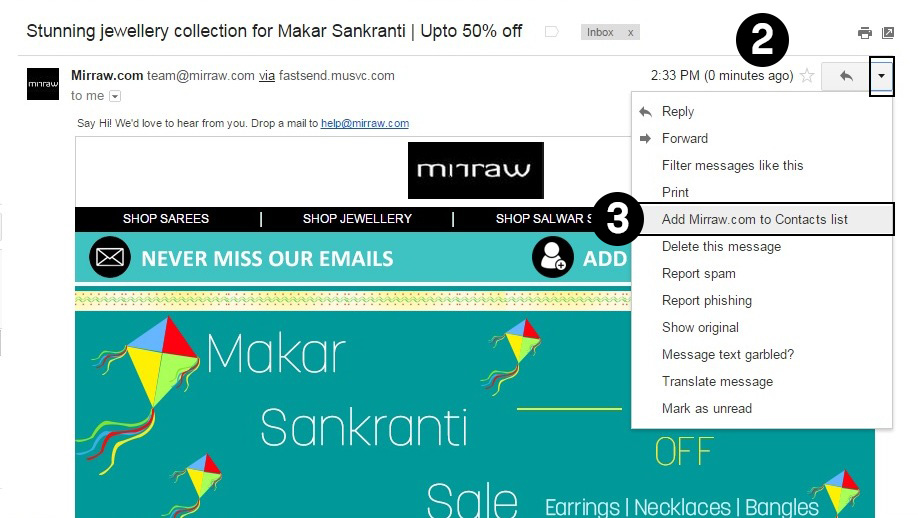
- Open newsletter sent by Mirraw.com from your inbox
- Click on the down pointing arrow indicating more options on the right side above the newsletter.
- Select “add Mirraw.com to the contact list”.
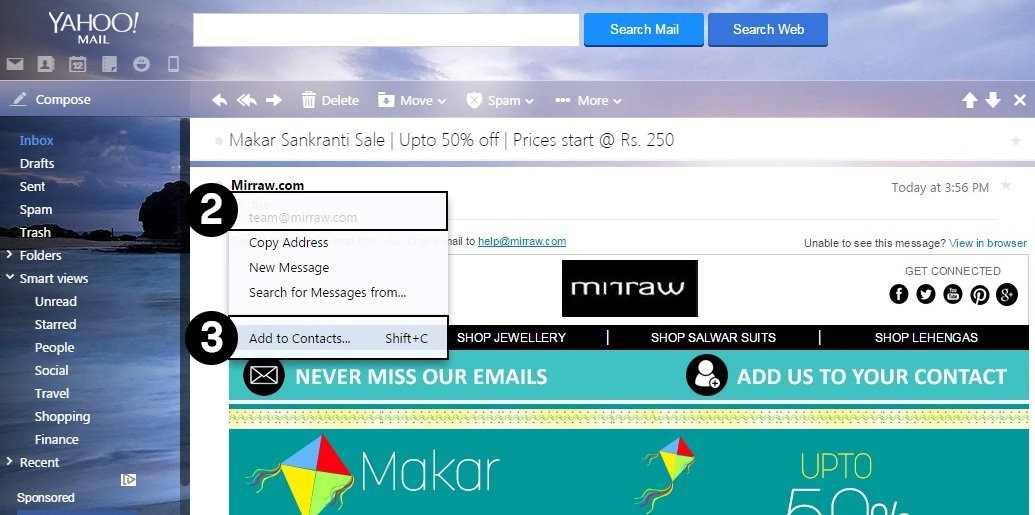
- Open newsletter sent by Mirraw.com from your inbox
- Click on senders name i.e. Mirraw.com
- Select “Add to Contact” (Shift + A).

- Business
- International Buyers
- Horoscopes
- Online Sales
- Kids Wear
- Gifts
- Fashion Updates
- Advertise With Us
- Designer Login
- Coupon Partners
- Mirraw Coupons
- Mirraw Offers

Press


Partners



Testimonials
"Mirraw was superfast. I ordered on 26th Dec and today (28th Dec) I got the product. I also got a call yesterday by the Gharpay executive before coming for the pick up, as committed by Team Mirraw. I Ordered Victorian Double Tokri Kashmiri Earring. The design and specially the color of the stones which I was specific to be the same as mentioned in the website was perfectly the same. Moreover, It looks amazingly beautiful with my Royal Blue and Pink Benarasi Saree. Very happy with the service. Keep it up Mirraw ! All the Best ! " -- Suranjeeta Das, New Delhi
"I'd like to take this opportunity to let you know that I am very happy with your customer service. I had an issue with a damaged piece and it was dealt with efficiently. I received the temple set and others in my order and I am extremely happy with your professionalism. All items were very well made and worth the money. Keep up the good work." -- Anjana Das, Tennessee, United States
Copyright © 2026, Mirraw Online Services Pvt. Ltd. All Rights Reserved.